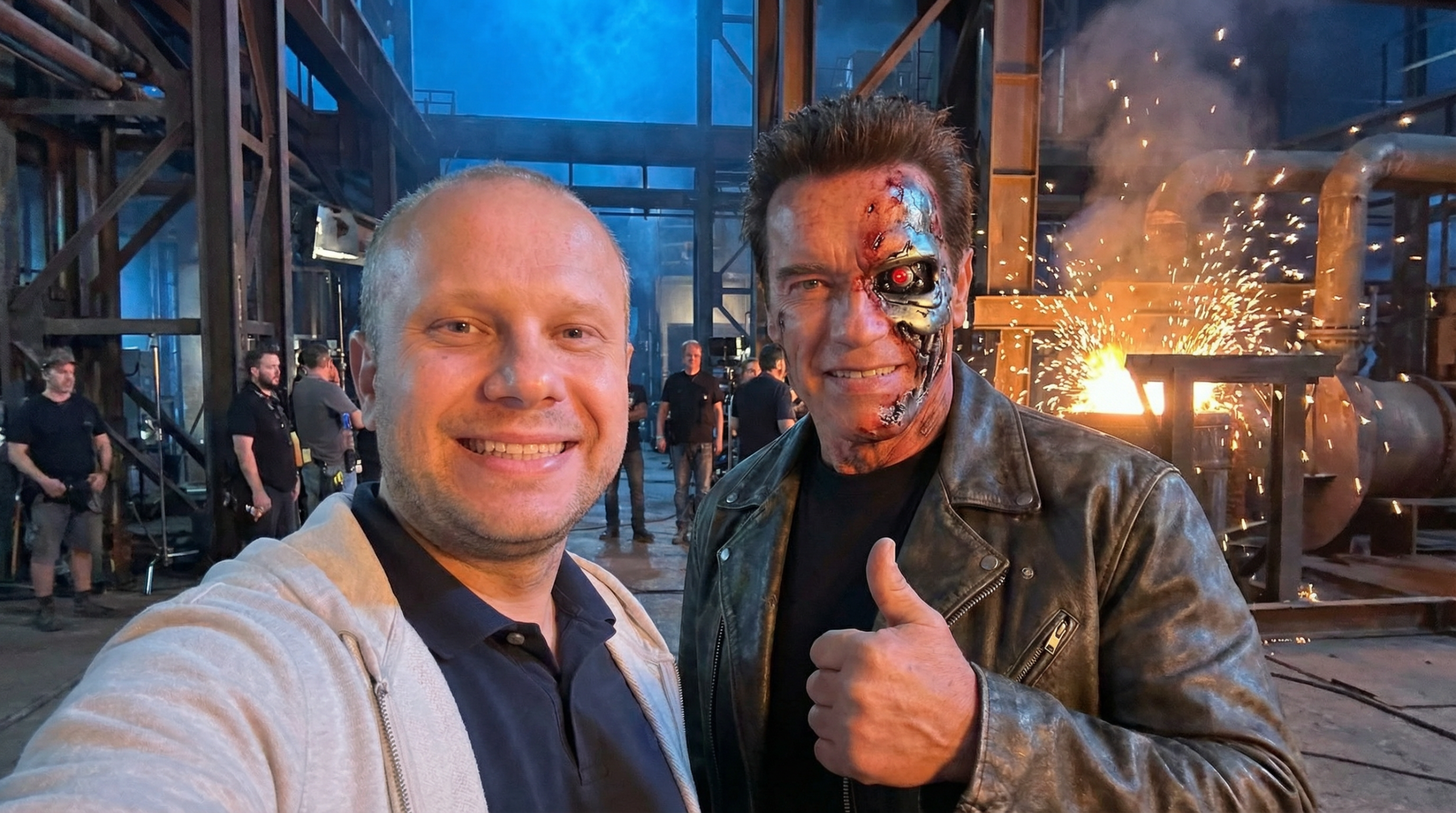
These videos are taking Instagram and TikTok by storm! Imagine taking selfies with Arnold Schwarzenegger on the Terminator 2 set, or posing with characters from Shrek, The Matrix, and more. I discovered the exact prompts and AI models to recreate these perfectly. Here’s the complete workflow, prompts, and details.
⚠️ LEGAL DISCLAIMER This content features AI-generated images and videos created for entertainment and educational purposes only. No actual celebrities participated in creating this content. All movie titles and character names are property of their respective copyright holders. For Personal Use Only: Generated content featuring celebrity likenesses should not be used for commercial purposes without proper authorization. Users are responsible for complying with applicable laws including right of publicity, copyright, and platform terms of service.
What You’ll Create
Upload your photo and embark on a cinematic journey through 8 iconic movie sets:
- Shrek’s swamp 🐲
- Wolf of Wall Street office 💼
- Terminator’s steel mill 🤖
- Die Hard’s Nakatomi Plaza 🔫
- Back to the Future’s DeLorean ⚡
- Truman Show’s Seahaven 🌅
- Pulp Fiction’s diner 🍔
- The Matrix lobby 🕶️
The final result? A 50-second epic journey with ultra-realistic selfies, seamless transitions, and a behind-the-scenes vibe complete with visible film crew.
The Complete Workflow
Step 1: Generate First and Last Frames with Nano Banana Pro
The foundation of this technique is creating the starting and ending frames for each scene using Nano Banana Pro (or any high-quality AI image generator).
The Master Prompt Template
Here’s the exact prompt I use for generating ultra-realistic selfies:
Ultra-realistic selfie captured strictly from a front-phone-camera perspective, with the framing and angle matching a real handheld selfie. The mobile phone itself is never visible, but the posture and composition clearly imply that I am holding it just outside the frame at arm's length. The angle remains consistent with a true selfie: slightly wide field of view, eye-level orientation, and natural arm-extension distance.

I am standing next to [CELEBRITY NAME], who appears with the exact age, facial features, and look they had in the movie '[MOVIE NAME]'. [CELEBRITY DESCRIPTION AND COSTUME DETAILS]. The background shows the authentic film set from '[MOVIE NAME]', specifically [SPECIFIC LOCATION DESCRIPTION], including recognizable scenery, props, lighting setup, and atmosphere that match the movie's era. Subtle blurred crew members and equipment may appear far behind to suggest a scene break.

We both look relaxed and naturally smiling between takes, with [CELEBRITY] giving a casual [GESTURE]. The shot preserves a candid and natural vibe, with accurate selfie-camera distortion, cinematic lighting, shallow depth of field, and realistic skin tones. No invented objects, no additional actors except blurred crew in the background. High-resolution photorealistic style. No phone visible on photo.
Example: Terminator 2 Scene
Here’s the filled-in prompt for the Arnold Schwarzenegger / Terminator 2 scene:
Ultra-realistic selfie captured strictly from a front-phone-camera perspective, with the framing and angle matching a real handheld selfie. The mobile phone itself is never visible, but the posture and composition clearly imply that I am holding it just outside the frame at arm's length. The angle remains consistent with a true selfie: slightly wide field of view, eye-level orientation, and natural arm-extension distance.

I am standing next to Arnold Schwarzenegger, who appears with the exact age, facial features, spiky crew cut, and look he had in the movie 'Terminator 2: Judgment Day'. He has realistic special effects makeup showing partial 'battle damage' on his face with exposed chrome endoskeleton. The background shows the authentic film set from 'Terminator 2', specifically the industrial steel mill with blue moonlight and orange molten sparks, including recognizable scenery, props, lighting setup, and atmosphere that match the movie's era. Subtle blurred crew members and equipment may appear far behind to suggest a scene break.

We both look relaxed and naturally smiling between takes, with Arnold giving a casual thumbs-up. Arnold wears the iconic distressed black leather biker jacket and black t-shirt. The shot preserves a candid and natural vibe, with accurate selfie-camera distortion, cinematic industrial lighting, shallow depth of field, and realistic skin tones. No invented objects, no additional actors except blurred crew in the background. High-resolution photorealistic style. No phone visible on photo.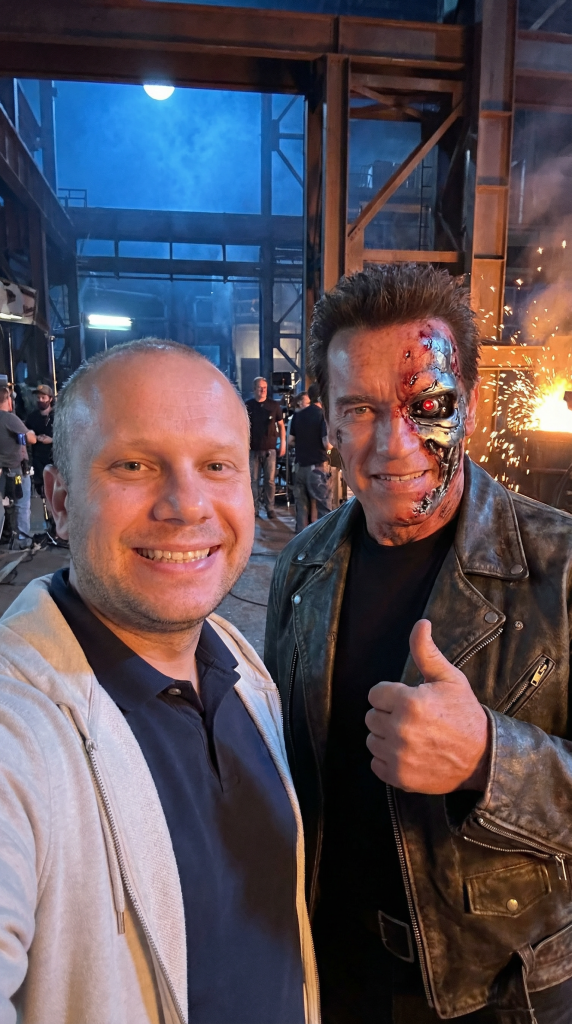
Upload your photo by removing the sample photo and clicking to upload your media. Then generate 2 frames for each scene:
- First frame: You at the starting movie set
- Last frame: You at the next movie set (for seamless transitions)
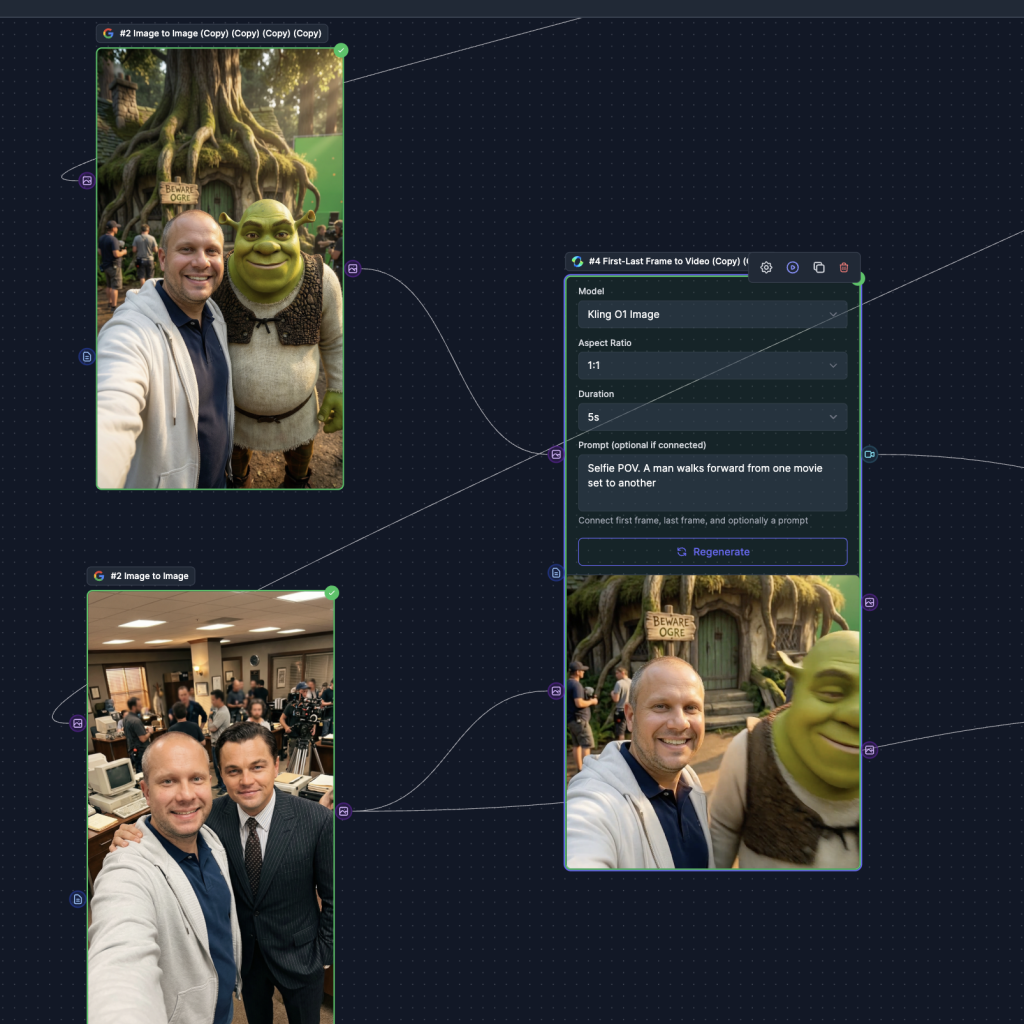
Please wait until all images are generated. If you don’t like a result, you can regenerate a specific node. Make sure you wear the same clothes in all images for better video transitions.
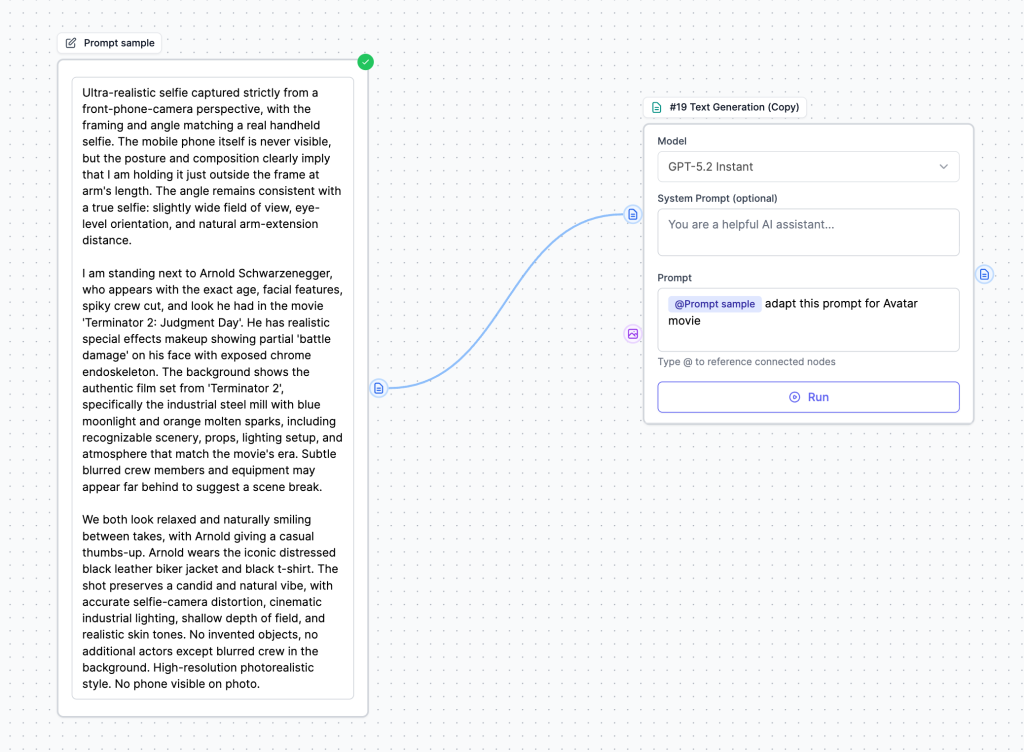
Step 2: Adapt Prompts for Different Movies with AI
Don’t want to manually rewrite the prompt for all 8 movies? Use ChatGPT or Chat with Marky (our AI chatbot) to automatically adapt the template!
Simply ask:
Adapt this prompt for [MOVIE NAME] with [CHARACTER NAME]:
[Paste the master prompt]
The AI will intelligently replace:
- Celebrity names and descriptions
- Movie-specific details
- Set locations and atmosphere
- Costume details
- Appropriate gestures and poses
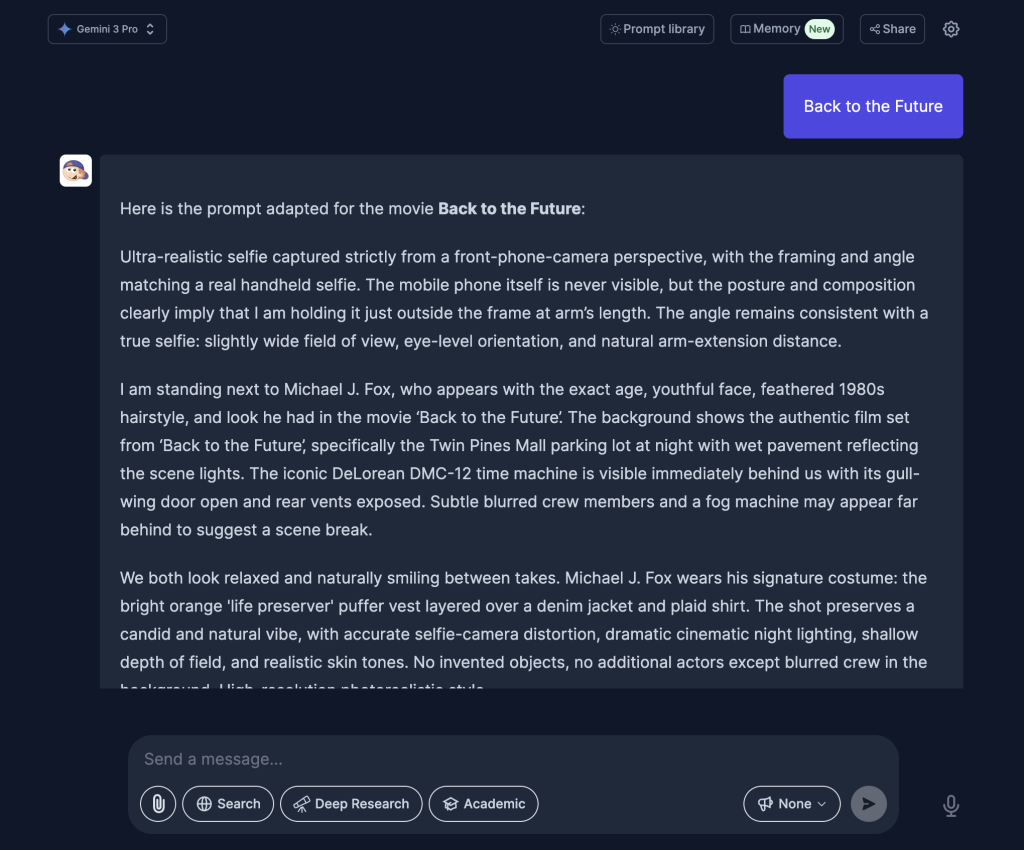
Another option is to use the Text Generation node provided in Template and changing to the desired movie.
Step 3: Generate Videos with Kling AI O1 (First & Last Frame)
Now for the magic! Use Kling O1 (available in Easy-Peasy.AI Workflows) to create the video transitions.
Why Kling O1? It supports first and last frame conditioning, which means you can control both the starting and ending points of your video for seamless transitions.
Generate transitions only once all images are done. If you don’t like a video, the transition isn’t correct, or the actor is moving instead of you, try tweaking the prompt by clicking “Show Settings” and updating the Instructions field. Instead of “person”, you can specify more details about yourself (e.g., “woman in glasses wearing purple t-shirt”). You can also adjust the video duration to 10 seconds if the scenes are too different, so the AI can create a proper transition.
Video Generation Prompt
Selfie POV. A person walks forward from one movie set to another
Settings:
- Model: Kling AI O1
- Duration: 5 or 10 seconds per scene
- First frame: Your image at Movie Set A
- Last frame: Your image at Movie Set B
- Aspect ratio: 9:16 (portrait for social media)

Repeat this process for all 8 transitions, creating a continuous journey through movie history!
Step 4: Merge All Videos Into One Epic Journey
Finally, combine all 8 video segments into one 50-second masterpiece. You can use:
- Video editing software (Adobe Premiere, Final Cut Pro)
- Or let Easy-Peasy.AI’s workflow handle it automatically via Merge Videos Node in Workflows!

The Results
The final video features:
- ✅ Ultra-realistic selfies with famous actors
- ✅ Seamless walking transitions between iconic sets
- ✅ Cinematic lighting and atmosphere
- ✅ Behind-the-scenes film crew vibe
- ✅ Professional quality suitable for Instagram Reels and TikTok
Try It Yourself (Easy Mode)
Don’t want to manually execute all these steps? I’ve created a complete template workflow on Easy-Peasy.AI that handles everything automatically:
👉 Movie Set Selfie Journey Template
Simply:
- Clone the template.
- Upload your photo.
- Click “Generate” for Images nodes. Please wait until all images are generated.
- Generate transitions only once all images are done.
- Merge transitions videos.
- Get your 50-second cinematic journey!

All prompts are pre-configured, and the workflow automatically:
- Generates all first and last frames
- Creates 8 video segments with transitions
- Merges everything into one final video
Tips for Best Results
Photo Selection:
- Use a clear, well-lit portrait photo
- Face should be clearly visible
- Neutral expression works best (AI will add the smile)
- Front-facing angle preferred
Customization Ideas:
- Change the movie selection to your favorites
- Adjust the number of scenes (4-12 works well)
- Try different celebrities and time periods
- Experiment with different transition styles
Social Media Optimization:
- 9:16 aspect ratio for Instagram Reels and TikTok
- Add trending audio in post-production
Since regeneration may be required, we recommend purchasing the Unlimited plan that includes 400 credits.
The AI Models Behind the Magic
Here’s what powers this workflow:
- Nano Banana Pro – Ultra-realistic image generation with exceptional detail and photorealism
- Kling AI O1 – First/last frame video generation for seamless transitions
- Chat with Marky – Intelligent prompt adaptation and customization
Frequently Asked Questions
Q: How long does it take to generate? A: Using the automated workflow, about 20-30 minutes for the complete 50-second video.
Q: Can I use my own movie scenes? A: Absolutely! Just modify the prompts with your chosen movies and characters.
Q: Is this legal for commercial use? A: These are AI-generated parodies for entertainment. Always check your local laws and platform guidelines.
Q: What about copyright? A: The AI creates original images inspired by movies, not actual movie footage. However, use responsibly and give credit where appropriate.
Q: Can I add more scenes? A: Yes! The template is fully customizable. Add as many movie sets as you want.
Conclusion
This AI workflow combines the latest in image and video generation to create something truly magical – your own personalized journey through cinema history. Whether you’re a content creator looking for viral potential or just want to have fun with AI, this technique delivers incredible results.
Ready to start your movie set selfie journey?
👉 Try the Full Workflow Template
Found this helpful? Share your creations with us on social media and tag @easy_peasy_ai!
About Easy-Peasy.AI
Easy-Peasy.AI is your all-in-one AI platform for creating images, videos, audio, and more. Our workflow builder lets you chain together multiple AI models to create complex, professional results with just a few clicks.